A good win rate is not an edge.
The journal for crypto perps on Bybit and Hyperliquid. Connected read-only, it fills itself, and then shows you what actually decides the result: payoff, costs, the rules you broke yourself.
- Bybit + Hyperliquid
- Read-only, no trade permissions
- Keys encrypted (AES-256)
- Export anytime

From the demo account · one setup, 15 trades
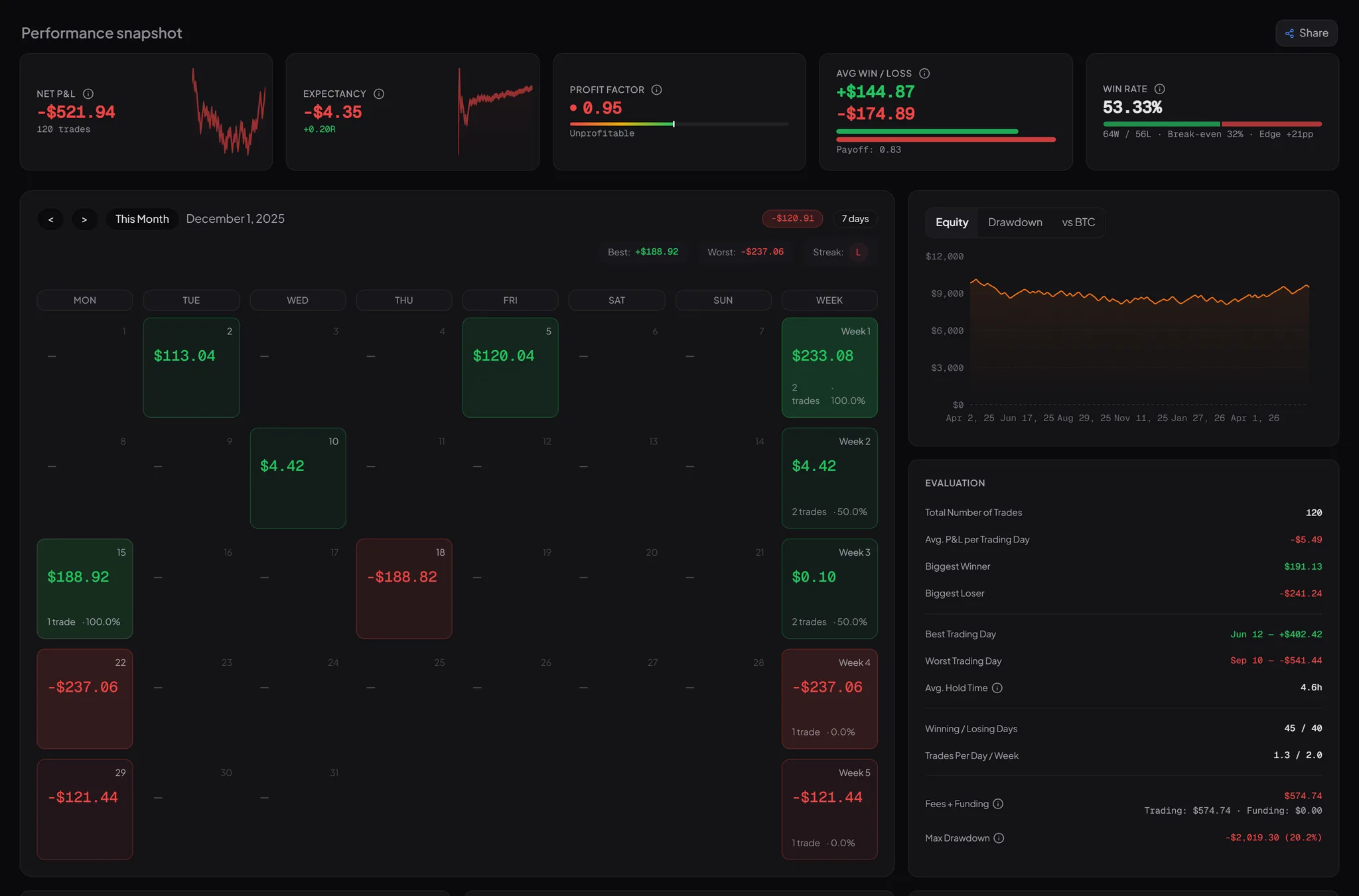
One setup wins 66.7% of its trades. By P&L it ranks second worst.
That setup sits inside an account that wins 53.3% of its 120 trades and still closes at −$521.94. The winners bring in $9,916.86 between them; the losers cost $10,438.80. More hits, less money.
PerpLog breaks that result down trade by trade. Every percentage carries its denominator, and no row disappears because it doesn't fit the picture.
See this breakdown in the demo accountWhere the net number comes from
120 tradesYou paste a read-only key. That is the whole effort.
- Paste a read-only key
- Sync runs
- Your trades are in
From a read-only key to a filled trade list. You never type a trade.
Bybit + Hyperliquid today. Binance is next on the list.
Features
Every mistake gets a price.
Before the trade
A rule you never wrote down is a rule you can't check.
Risk & liquidation proximity
ProSizing stays silent below 20 closed trades and on an unproven edge — no Kelly math on noise.
Works off your real numbers: a capped Half-Kelly as the suggestion, and next to it the odds of losing half the account at that size.
After the trade
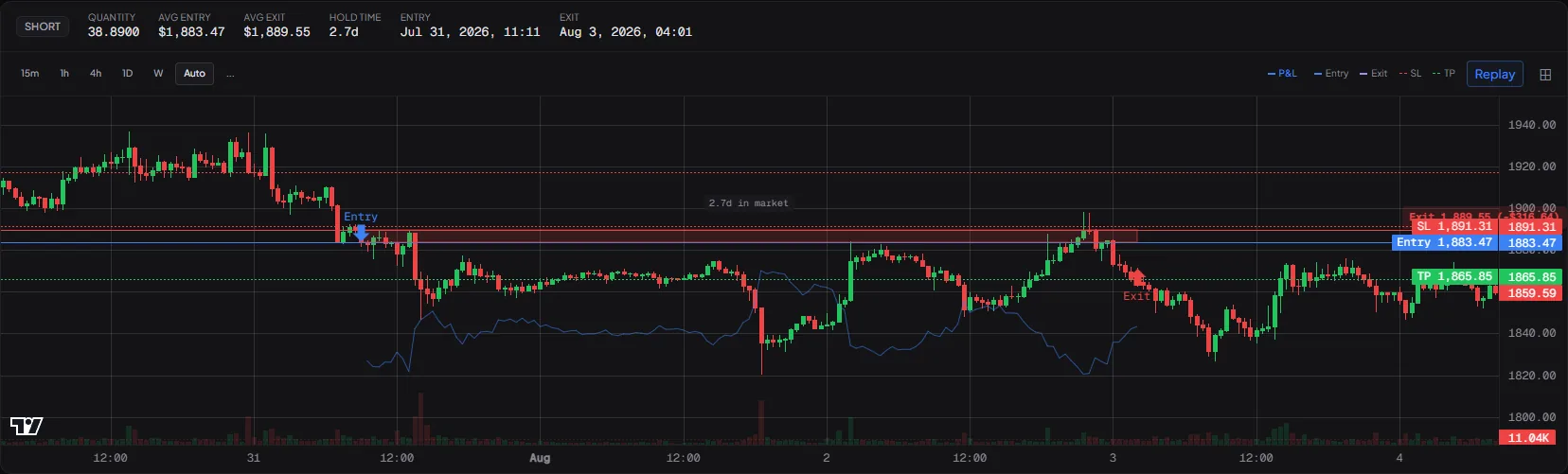
Trade replay with annotations
Pro
What your tilt costs, in dollars
FreeObserved gap between the two groups — an association, not a causal estimate.
PerpLog prices the gap between your calm and your tilted trading: per trade, so the figure cannot grow with your good trades. It never appears without the count it came from.
AI Coach
ProClean idea, clean risk, but no trade management: ran to +1.21R, out at −1.08R. Gave back 2.29R.
Reads your recent trades and names the pattern (revenge, tilt, overtrading), always with the trades it came from.
Over time
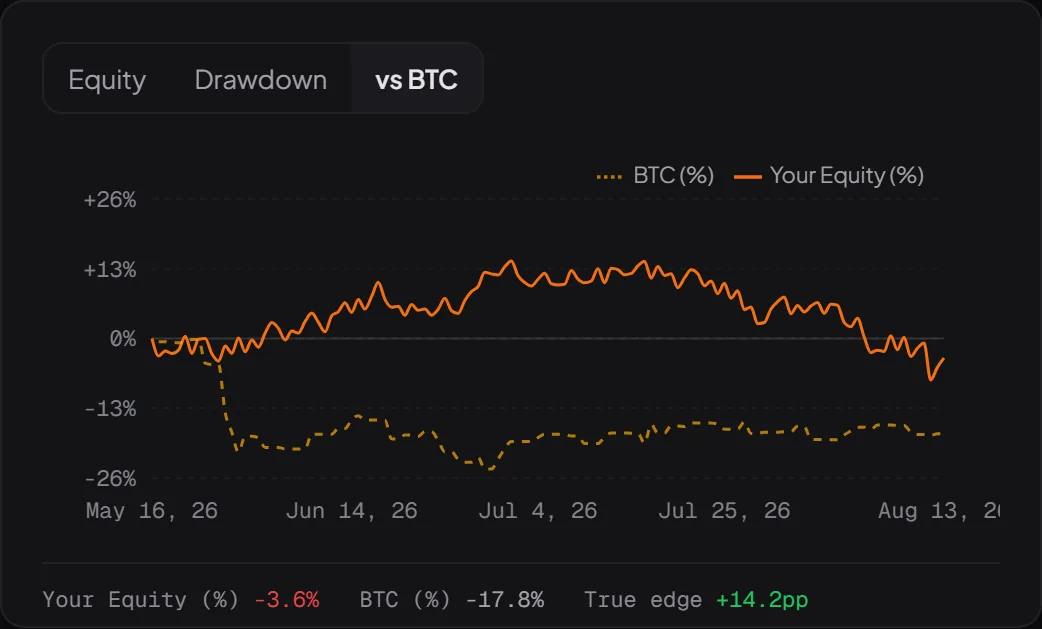
Are you getting better, or did you just have a good month?

BTC benchmark
ProTags for repeat mistakes, strategy timeline, skill progression, data export, weekly reviews:see the full feature list in the comparison →
What PerpLog can do, and what it can't.
You are connecting a trading account. Here is what happens with it, and what does not.
PerpLog reads
- Closed trades & executions
- Funding payments & fees
- Open positions & wallet balance
PerpLog cannot
- Place or change orders
- Withdraw or transfer
- Ask for a key on Hyperliquid at all (a wallet address is enough there)
Your data
- Keys encrypted with AES-256-GCM, master key not in the database
- CSV export on the Free plan, no lock-in
- Account and data deletable at any time
What the AI coach sends is named in the privacy policy — Anthropic does not train on it.
Staying honest: a read-only key still exposes your trading and account data. That is why I store it encrypted, and why you can revoke it at any time.
Who builds this
Julien
I build PerpLog on my own and trade perps on Bybit myself. No VC, no investor roadmap. Features ship in the order active traders need them, and support comes straight from me.
I built PerpLog after my own account showed me that a good win rate was hiding a negative payoff. I journal my trades here — the account is down, and the journal shows exactly why.
PerpLog is new. There are no customer quotes I could honestly show you. That is why the whole demo account is open, with no signup.
And if PerpLog ever shuts down: 30 days notice by email, with a final export link. Your history leaves with you.
Journaling costs you nothing.
Pro starts where you want to measure your patterns: playbook, replay, benchmark.
14 days of full Pro, no credit card. Then Free, free forever.
Prices in EUR, final — no VAT is charged (§ 19 UStG). Other currencies at checkout.
Complete for journaling. One limit: 30 days of history.
- 1 exchange account (Bybit or Hyperliquid), read-only sync
- Trade history (last 30 days)
- Manual journaling: notes, emotions, lessons
- Daily-session reflection with mood tracking
- Trade listing, filter & detail view
Everything in Free, plus the analysis you actually came for.
- Unlimited history & unlimited accounts
- AI coach with pattern detection (revenge, tilt, overtrading)
- Strategy playbook, setup compliance & repeat-mistake tags
- Trade replay with annotations
- Strategy timeline, BTC benchmark & skill progression
- Data export for taxes (DE/AT), not tax advice
Cancel anytime, no lock-in. You keep Pro until your period ends.
Both buttons open the same registration: 14 days of full Pro, no credit card. Afterwards you decide whether to stay on Free or go Pro.
See the comparison →Common questions
Security and data access are answered above. Here is the rest.
Bybit (USDT perpetuals, read-only API key) and Hyperliquid (perps, read-only wallet address, no keys at all), including Hyperliquid's builder-deployed markets. Binance, OKX and Bitget aren't in yet; more exchanges are in the works, but quality comes first: every integration has to get funding, fees and partial fills right. Tell me which exchange you're missing.
TradeZella and Tradervue are multi-asset tools: stocks, options, futures, crypto in one. PerpLog does one thing: crypto perpetuals on Bybit and Hyperliquid. Two concrete consequences: funding payments are properly aggregated to the trade instead of disappearing as "misc fees", and if you set rules on a strategy (SL required? Risk within limit?), the Setup Compliance Engine automatically checks every closed trade against them. If you trade crypto perps, you want crypto-specific.
If you actually maintain it and extract patterns from it: yes, then you don't need PerpLog. What Excel doesn't do: aggregate funding payments to trades, compute MFE/MAE excursions, cluster trades by time-of-day or setup, or ask you at trade close whether it broke your own rules. PerpLog automates the bookkeeping so you can spend the time on pattern work, not table work.
Up to 2 years back; that's Bybit's API limit, not mine. On first sync, PerpLog pulls all executions in that window and organizes them into trades including funding, fees, and multi-entry positions. After that, sync runs incrementally. On the Free plan you see the last 30 days of it.
Yes, fully. Trade Detail has its own mobile view with tab switching (Overview, Chart, Review, Journal, Context). No native iOS/Android apps; the mobile browser is intentionally good enough so you can review on the couch on weekends.
Can you name the mistake that repeats in your last 30 trades?
Read-only, connected in two minutes. 14 days of full Pro, no card. Then Free, for good.